
Introduction
This post covers the initial development of the internal-facing front-end intake application: CDX Web Scan (cdx-web-scan). It serves as the first module in the CDX system pipeline, providing a mobile-friendly, utility-first interface for capturing physical “widgets” (CDs) and submitting them into an enterprise-style intake and processing workflow.
While CDs are the concrete input for this project, the application is intentionally designed to model a generic enterprise intake UI, similar to those used for:
- Inventory receiving
- Asset on boarding
- Order entry
- Warehouse intake
- Document capture systems
The focus is on front-door intake mechanics, including batching, validation, traceability, and durability. Each scan represents a durable unit of work that can be audited, replayed, and handed off reliably to downstream services in the pipeline.
The application is built using Flask (https://flask.palletsprojects.com/en/stable/), the popular Python-based web framework. HTMX (https://htmx.org/) is used to provide dynamic, SPA-like (Single Page Application) page updates without the overhead of a full client-side framework (such as Angular, React, Vue, etc.). Some client-side JavaScript is used for mobile camera access and barcode capture, along with custom CSS for a clean, minimalist visual style, suitable for an internal utility application.
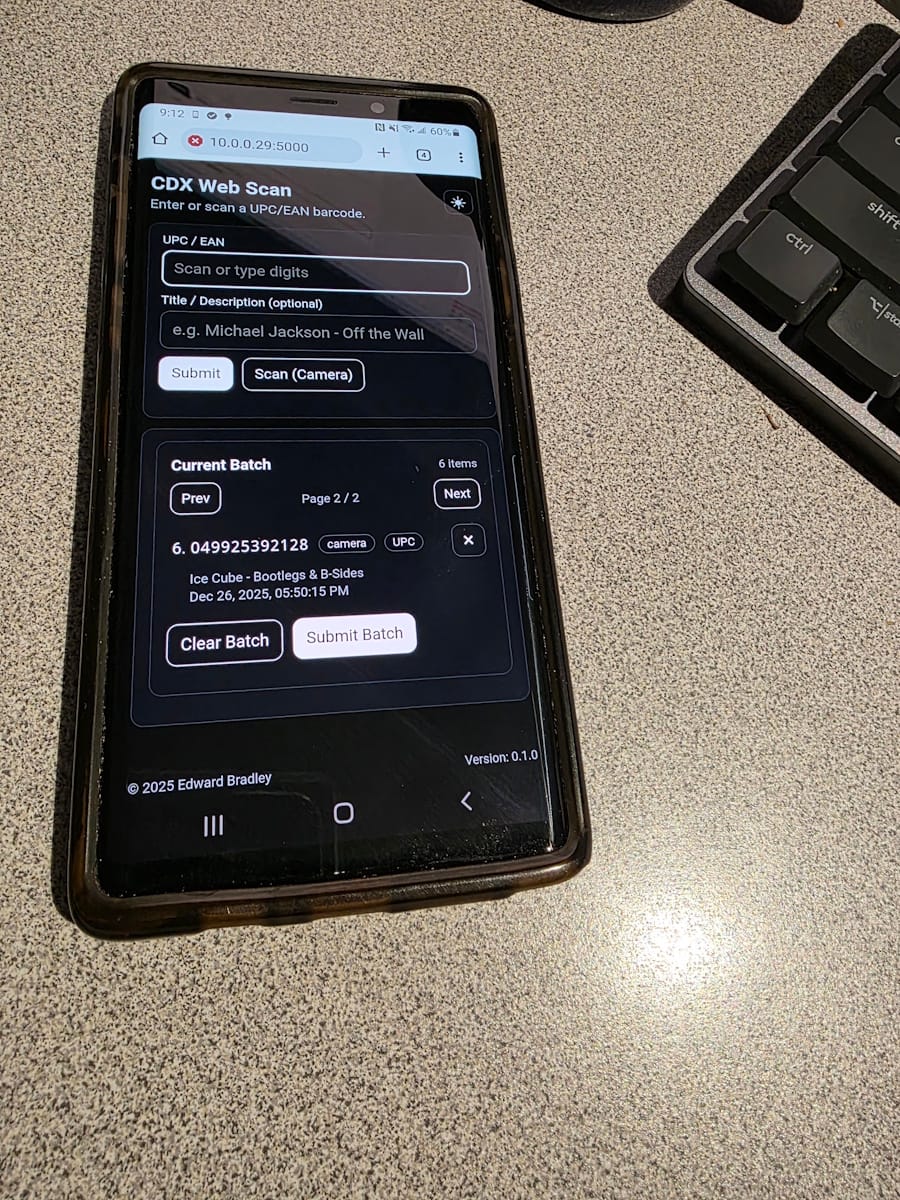
The application is deployed as a "Dockerized", multi-container stack, orchestrated with Docker Compose. The Flask-based Python WSGI application runs as the backend service, fronted by a NGINX reverse proxy responsible for HTTP/S termination and request routing, providing a clean separation of concerns aligned with enterprise deployment practices.
Features
What CDX Web Scan does (today):
CDX Web Scan is an internal, mobile-friendly intake tool designed for fast, repeatable “capture → validate → batch → submit” workflows. It’s built to feel like the front edge of a real enterprise receiving system:
- simple UI/UX with minimal friction
- durable local state so an operator can keep moving even when the network isn’t perfect.
Core operator workflow:
- Barcode capture (camera + manual fallback)
Operators can capture barcodes using a phone camera (mobile-friendly) or type/paste them manually. This is intentionally pragmatic, camera scanning is fastest, but manual entry keeps the workflow unblocked. - Input validation + barcode classification
Submissions are validated (so the UI can immediately reject obviously invalid values), and barcodes are heuristically classified (UPC vs EAN family) to support clearer display and downstream handling. - Session-backed batching
The UI maintains a “batch” of scanned items so operators can capture multiple widgets (CDs) before submitting. - Batch paging + duplicate prevention
When batches grow, the UI paginates the list to keep the page usable on mobile. It also prevents duplicates in the active batch, which avoids operator confusion and reduces downstream cleanup.
Durability and operational traceability:
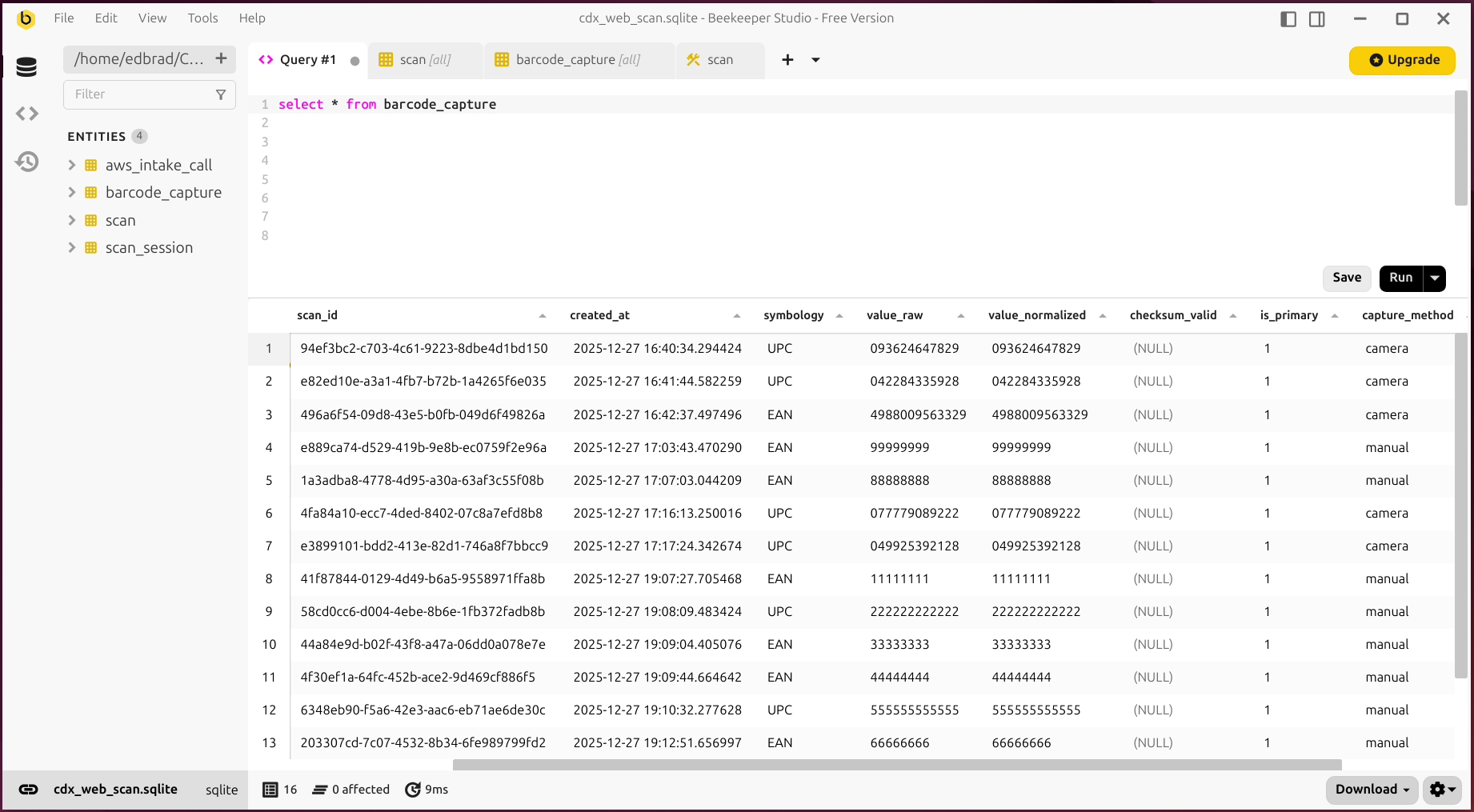
- Local SQLite database for scan history
In addition to the interactive batch UI, the app maintains a local database of scan events. This provides a durable “source of truth” for what was captured, when, and by what method (camera/manual/scanner):
- API call history (for tracking and recovery)
The app also tracks outbound Intake API attempts and status. That audit trail is critical for troubleshooting (what was sent, what happened, what needs retry), and it’s the foundation for more robust recovery flows.
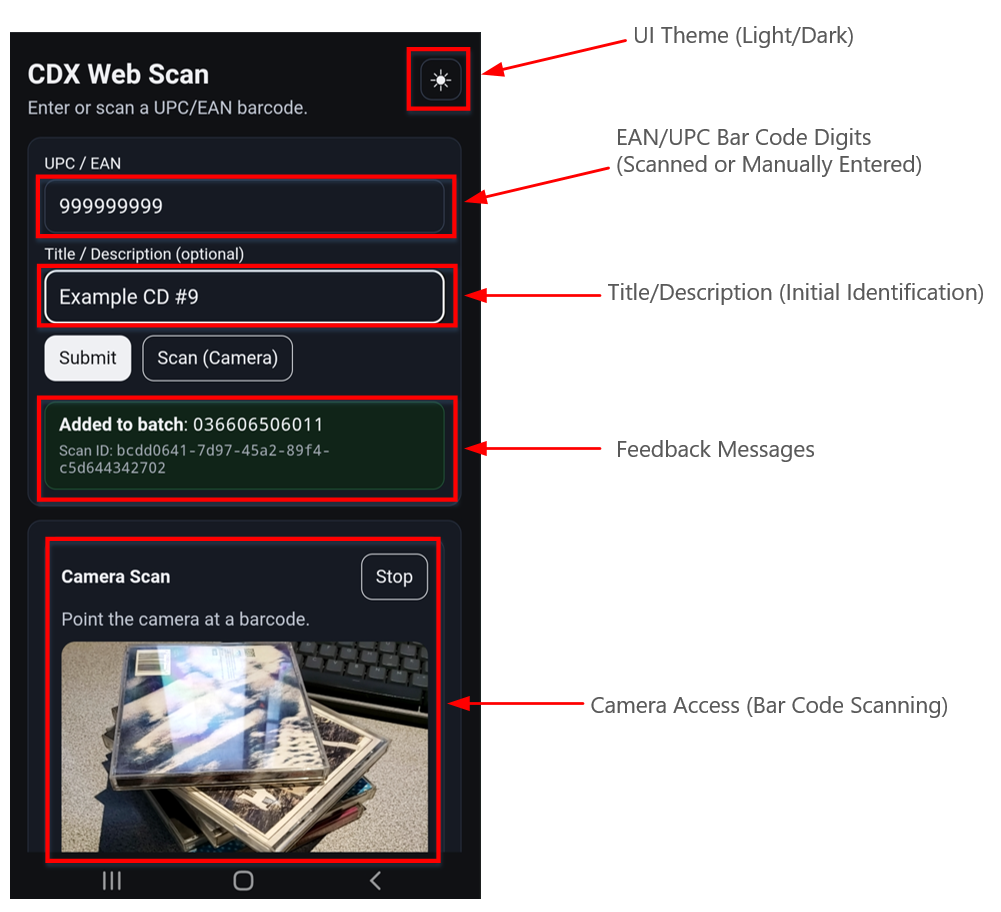
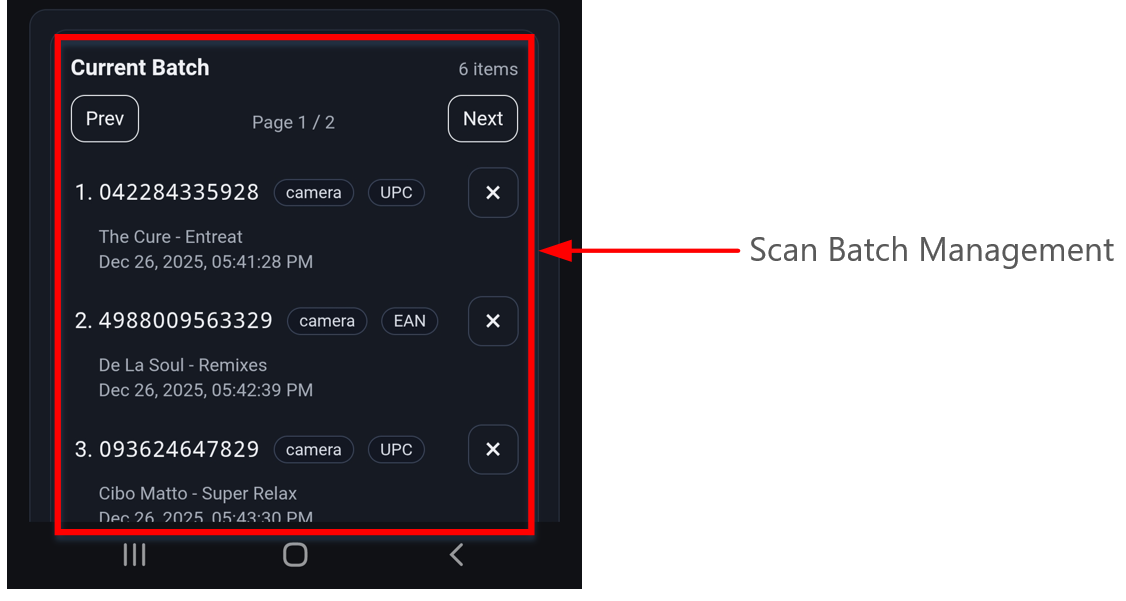
As the broader system continues to evolve, additional refinements and fixes will be applied to the application. At this stage, however, the core intake mechanics are in place, providing a solid foundation on which the remainder of the pipeline can be built.
Development
I chose to develop this application on Linux, using an Ubuntu 24.04 Desktop virtual machine. Working within Linux provides a runtime environment that closely mirrors the target deployment platform (Ubuntu Server), while native Docker support simplifies container builds, networking, and deployment staging without the additional abstraction layers often encountered on non-Linux hosts (such as Windows Subsystem for Linux).
For development and editing, I’m using Microsoft Visual Studio Code (VS Code) as the code editor, along with extensions to support Python-based web development. These tools provide features such as syntax highlighting, linting, debugging, Git/GitHub integration, and Docker workflow support, helping streamline development:
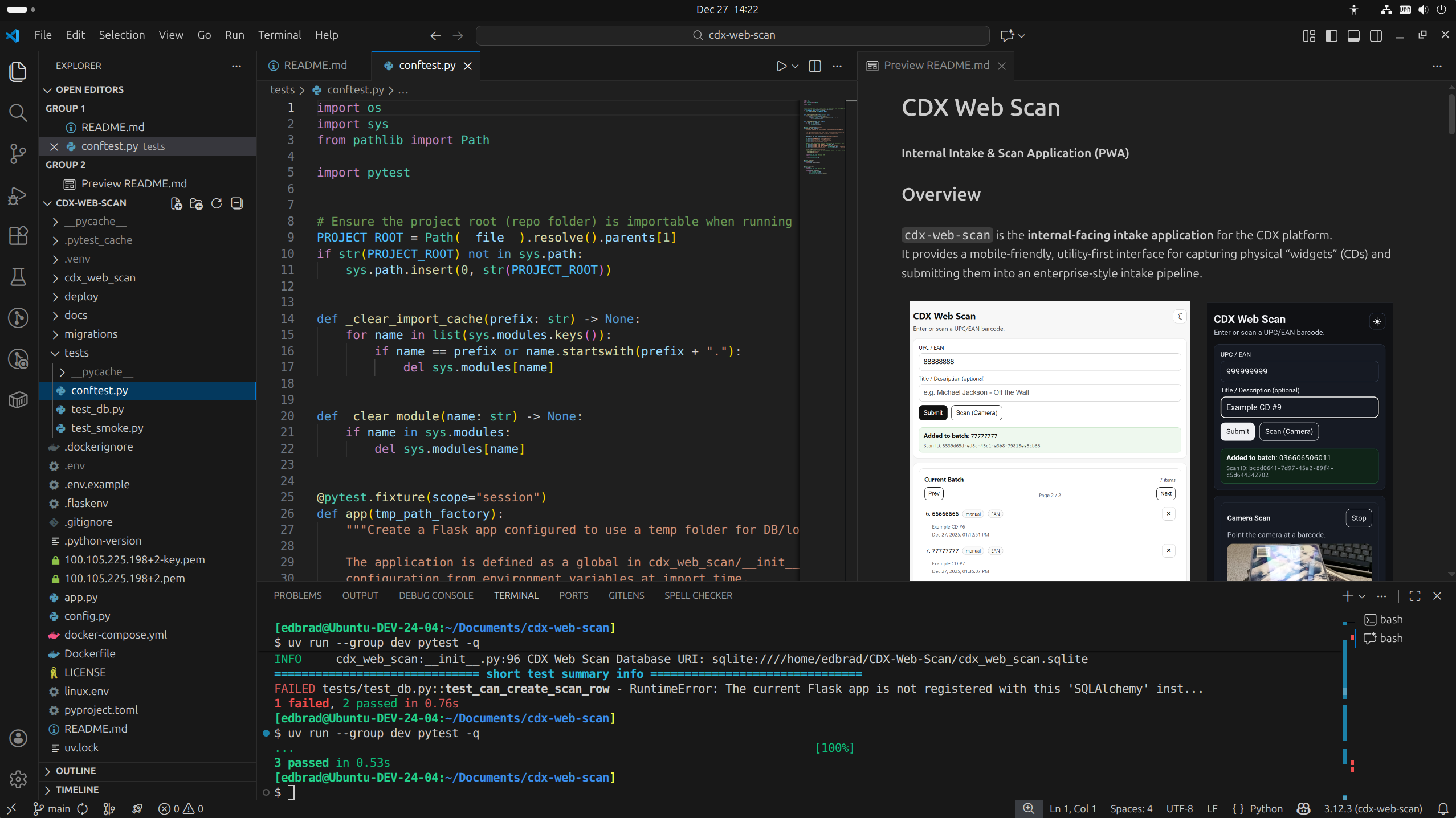
Over the years I’ve settled on a Flask structure that scales well without becoming too cluttered: I treat each major page or function of the app as its own mini-module, and I use Flask Blueprints to implement the boundaries. Each feature folder owns its routes and forms, so the app grows by adding folders, keeping the code organized and easier to maintain 😁.
High-level layout (what lives where):
- Entry points & configuration
app.pyis a thin entry point (and administrative shell interface).config.pyis where environment-driven config lives (dev vs prod), keeping deployment concerns out of route code.
- Application package (the real “app”)
__init__.pycreates the Flask app, configures logging + DB, and registers Blueprints.models.pyholds SQLAlchemy models (the durable local “truth” for scans + API call history).
- Blueprint-per-feature folders
\web_scanis a feature module: it owns the “scan” experience and its routes (views.py) and input validation (forms.py).\error_pagesis another feature module, focused on error handling (handlers.py).
- Templates & static assets
\templatescontains Jinja templates, including page templates and smaller fragments used for HTMX partial updates.\staticcontains JS/CSS/PWA assets (service worker, manifest, etc.).
- DevOps / deployment
docker-compose.yml,Dockerfile, andnginx.confdefine the production-style deployment (Gunicorn + NGINX).
- Migrations / schema evolution
\migrationsholds Alembic scaffolding for database evolution over time.
Why this structure has worked for me:
- Blueprints make ownership obvious. If you want to understand a feature, you open one folder and follow the trail from routes → templates → helper code.
- Adding features doesn’t “break” the layout. New features become new subfolders/Blueprints rather than new sections inside an ever-growing monolith file.
- Concerns are kept separate without over-architecting. The app factory/config lives in one place, while feature code stays feature-focused.
Source Code Management
The project is under Git/GitHub Source Control. The public repository is available for review and cloning at: https://github.com/ed-bradley/cdx-web-scan:
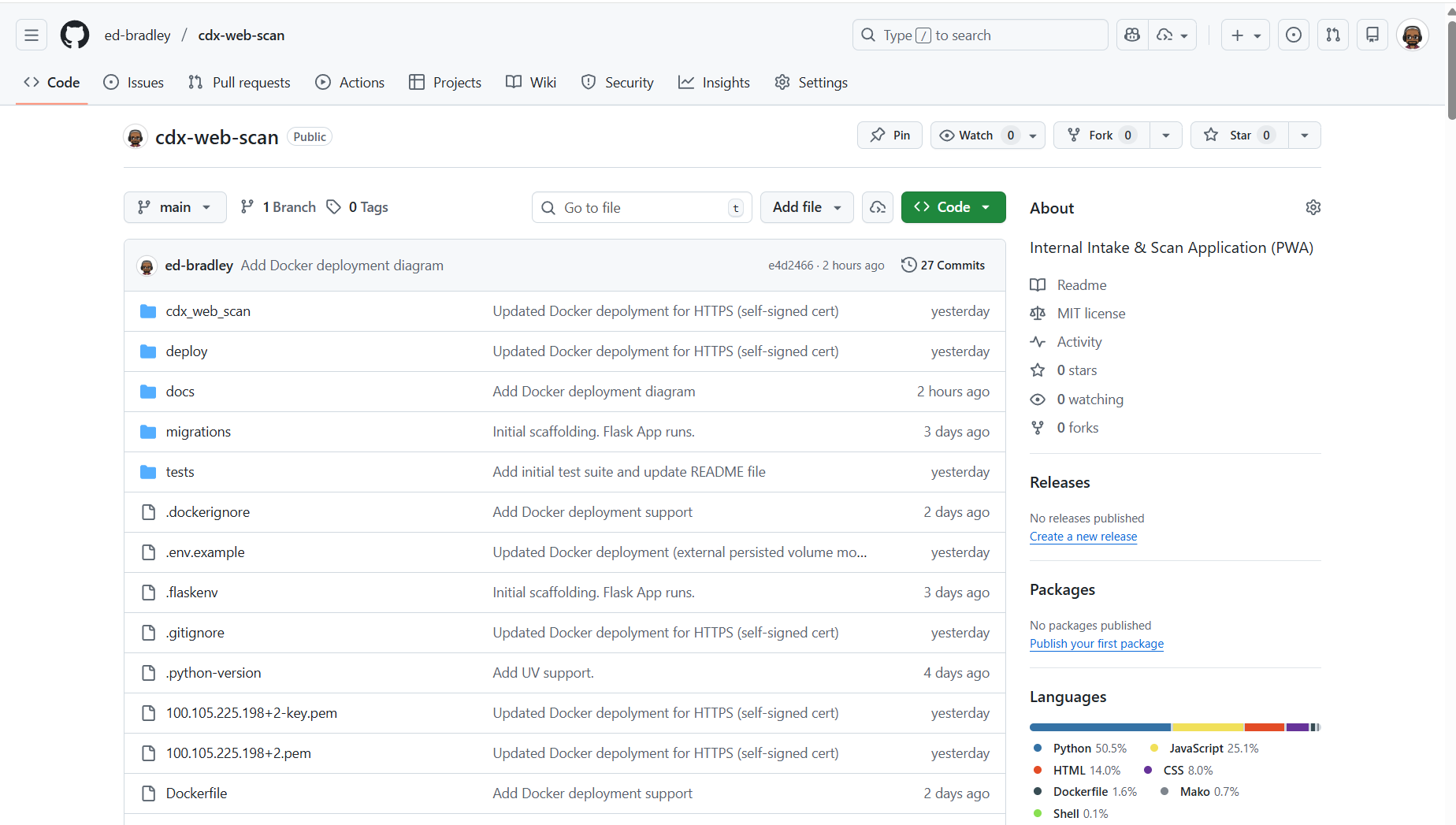
I will continue to update and refine this repository as the project evolves and additional functionality is implemented. As the system matures, my longer-term objective is to establish a fully automated CI/CD pipeline to support ongoing development, testing, and deployment.
This pipeline will enable consistent builds, automated validation, and reliable promotion of changes across environments, helping ensure the system remains maintainable, repeatable, and production-ready as it grows.
Deployment
At this stage, the AWS intake API and queue components have not yet been implemented, so they are not yet wired into this module:
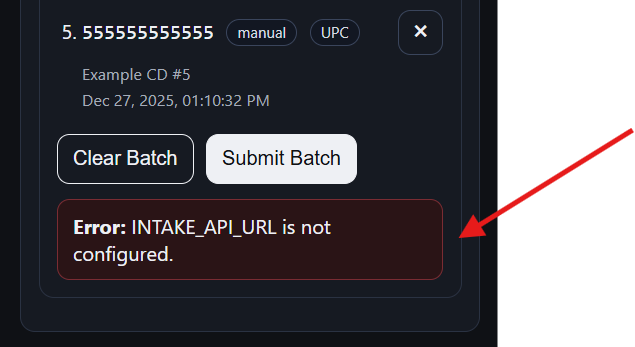
To keep development moving forward, I staged and validated the deployment process locally on my development workstation, ensuring the application can be built, started, and operated end-to-end in a controlled environment.
For this module, I chose Docker as the deployment mechanism. Containerizing the application allows the full runtime environment, including dependencies, configuration, and service layout, to be captured explicitly and reproduced consistently. This approach enables reliable testing during development and provides a clear path to repeatable, low-risk deployment on the live production server when the AWS intake API and queue are introduced.
Docker Deployment overview
The application is deployed as a containerized service, using Docker and Docker Compose to orchestrate the runtime environment. The core application is a Python-based WSGI service (built with Flask) running in its own container, while a separate NGINX reverse proxy container sits in front of it to handle inbound HTTP/S traffic:
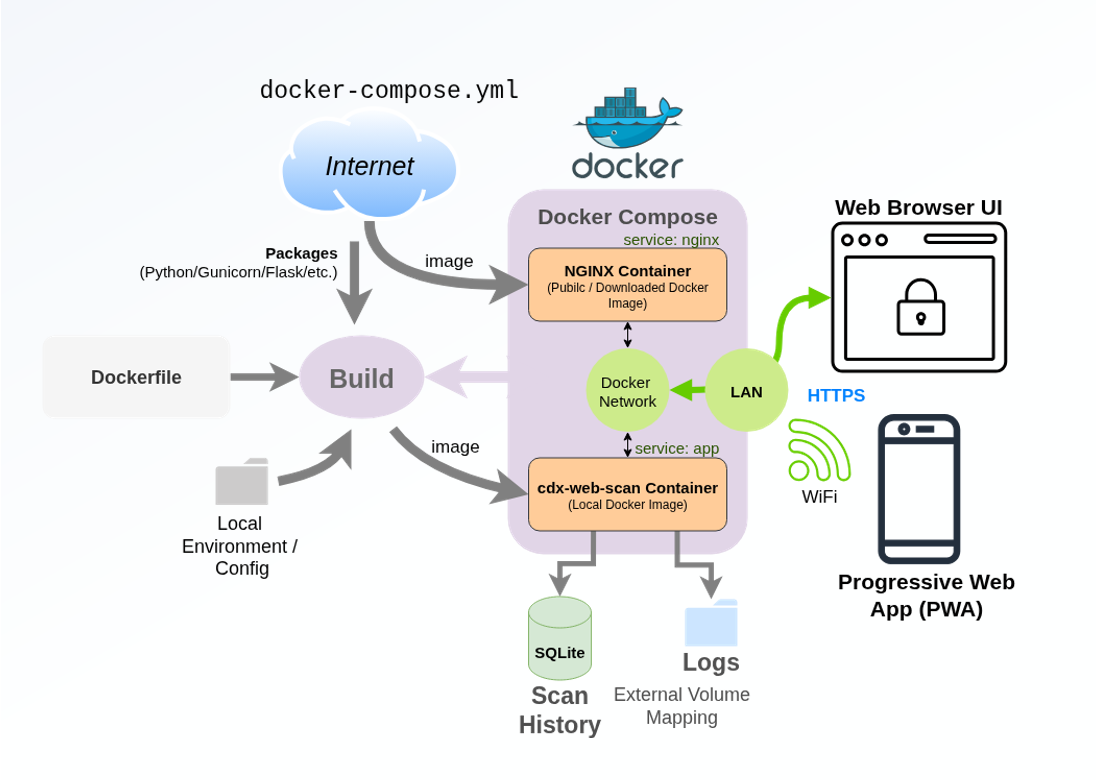
This layered deployment mirrors common production patterns, allowing responsibilities to be cleanly separated: NGINX provides request routing, connection handling, and static asset delivery, while the cdx-web-scan Flask application focuses exclusively on request processing and business logic. Docker Compose is used to define and manage the multi-container stack, making the deployment reproducible, portable, and easy to operate across development and lab environments.
Below is the current working Dockerfile being used to build the cdx-web-scan image:
# Production image: Gunicorn serves Flask app, NGINX runs separately in docker-compose

FROM python:3.12-slim

ENV PYTHONDONTWRITEBYTECODE=1 \
    PYTHONUNBUFFERED=1

WORKDIR /app

# System deps (tail for /get-log; certificates for outbound HTTPS)
RUN apt-get update \
    && apt-get install -y --no-install-recommends ca-certificates \
    && rm -rf /var/lib/apt/lists/*

# Install Python dependencies first for better layer caching
COPY pyproject.toml README.md LICENSE ./
RUN python -m pip install --no-cache-dir --upgrade pip \
    && python -m pip install --no-cache-dir gunicorn \
    && python -m pip install --no-cache-dir .

# Copy application source
COPY . .

# Add persistent data directory (SQLite DB + logs)
RUN mkdir -p /data

# TCP Port
EXPOSE 8000

# Gunicorn settings can be tuned via custom env vars
ENV GUNICORN_BIND=0.0.0.0:8000 \
    GUNICORN_WORKERS=2 \
    GUNICORN_THREADS=4 \
    GUNICORN_TIMEOUT=60

# Run Gunicorn and expose the cdx-web-scan App!
CMD ["sh", "-lc", "gunicorn --bind ${GUNICORN_BIND} --workers ${GUNICORN_WORKERS} --threads ${GUNICORN_THREADS} --worker-class gthread --timeout ${GUNICORN_TIMEOUT} cdx_web_scan:app"]
Below is the current working Docker Compose orchestration file (docker-compose.yml):
services:
  app:
    build:
      context: .
      dockerfile: Dockerfile
    restart: unless-stopped
    user: "${CDX_WEB_SCAN_UID:-1000}:${CDX_WEB_SCAN_GID:-1000}"
    environment:
      # Flask config selector (required; used by cdx_web_scan/__init__.py)
      APP_MODE: config.ProdConfig
      APP_SERVER_OS: Linux

      # Required for sessions
      SECRET_KEY: ${SECRET_KEY}

      # Persist DB + logs to /data (mounted volume below)
      CDX_WEB_SCAN_FOLDER: /data
      CDX_WEB_SCAN_DB_FILE_NAME: cdx_web_scan.sqlite
      CDX_WEB_SCAN_LOG_FILE: /data/cdx_web_scan.log

      # Intake API
      INTAKE_API_URL: ${INTAKE_API_URL}
      INTAKE_API_TOKEN: ${INTAKE_API_TOKEN}

    volumes:
      # Bind-mount host folder to persist SQLite DB + logs outside Docker
      - ${CDX_WEB_SCAN_HOST_DATA_DIR:-./cdx_data}:/data

  nginx:
    image: nginx:1.27-alpine
    restart: unless-stopped
    depends_on:
      - app
    ports:
      - "8080:80"
      - "443:443"
    volumes:
      - ./deploy/nginx.conf:/etc/nginx/conf.d/default.conf:ro
      - ./deploy/certs:/etc/nginx/certs:ro
How the Docker deployment works
- Build phase (image creation)
- Docker Compose builds the
appimage fromDockerfile. - That image is based on
python:3.12-slim, installs the packages listed in thepyproject.tomlfile, and installs Gunicorn (Python App Server) - The container’s default command runs Gunicorn and serves the Flask WSGI object
cdx_web_scan:appon0.0.0.0:8000(configurable viaGUNICORN_*env vars).
- Docker Compose builds the
- Orchestration phase (docker compose)
docker-compose.ymldefines two services:app: runs the Gunicorn container. It sets:APP_MODE= so the Flask app loads production or dev/test config.CDX_WEB_SCAN_FOLDER= where external files liveCDX_WEB_SCAN_DB_FILE_NAME/CDX_WEB_SCAN_LOG_FILEfor the exact external DB and Log filenames.- It also bind-mounts
${CDX_WEB_SCAN_HOST_DATA_DIR}:/dataso/datapersists to an external folder on the host, and runs as${CDX_WEB_SCAN_UID}:${CDX_WEB_SCAN_GID}so those persisted files aren’t owned by root.
nginx: uses the stocknginx:1.27-alpineimage and depends on app.
- NGINX reverse proxy + TLS termination
- NGINX loads its config from
nginx.conf. - It publishes:
443:443for HTTPS (TLS terminates at NGINX using the self-signed cert/key mounted from certs)8080:80for HTTP, which simply redirects to HTTPS.
- NGINX proxies requests to the app over the Docker network at
http://app:8000.
- NGINX loads its config from
- Runtime config / secrets
- This is for values like
SECRET_KEY,INTAKE_API_URL, and persistence settings via.env(passed to Compose with--env-file .env). The list of parameters will be updated as the project progresses.
- This is for values like
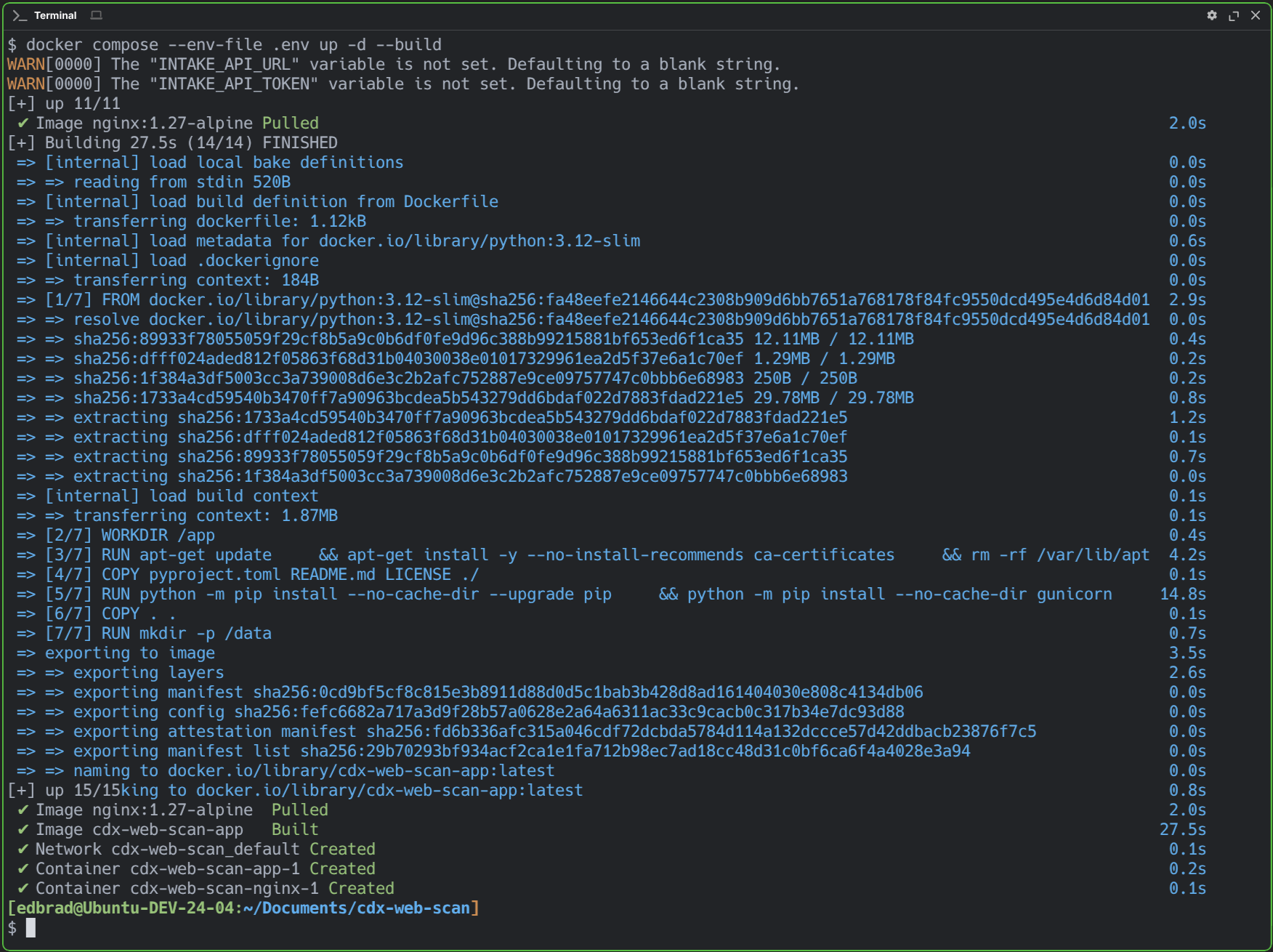
Below is a capture of the successful Docker Compose container build and start-up:
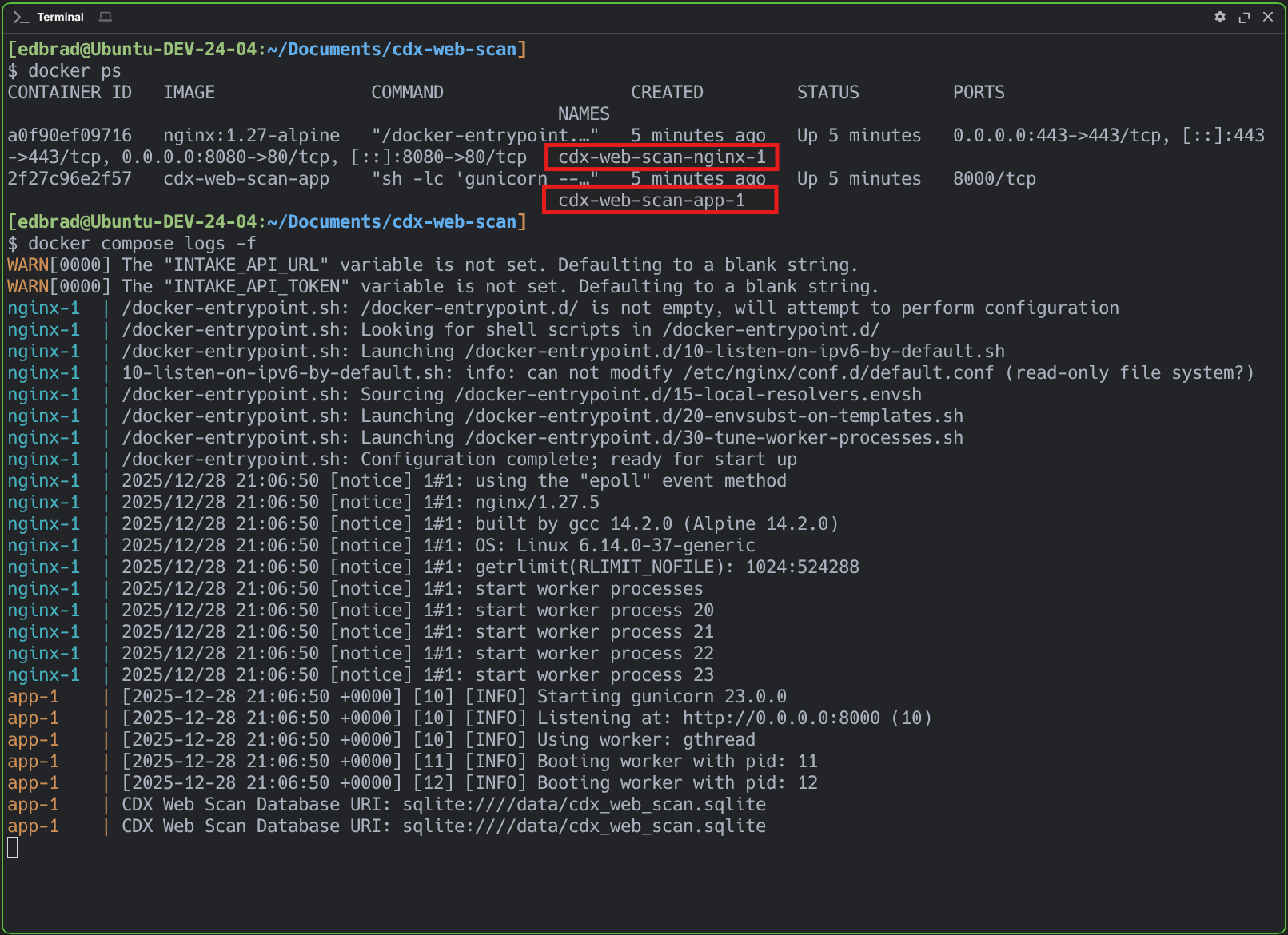
And confirmation that the containers (cdx-web-scan-nginx-1 & cdx-web-scan-app-1) are up and running, as expected:
The next phase of this application will focus on integrating it with the forthcoming AWS Lambda–based intake API and queuing module, completing its role as the front-door component of the larger processing pipeline. This integration will allow captured scan data to be handed off asynchronously to downstream services for enrichment and processing.
In parallel, the application will be deployed to the designated "CDX" Web server, transitioning from my development environment to a more production-like operational setup. The deployment will be secured using a SSL/TLS certificate issued by the internal Certificate Authority for the lab's Active Directory domain (edbradleyweb.local), maintaining encrypted access while maintaining trust within the internal network.
Wrap Up
CDX Web Scan represents the successful establishment of the front-door intake layer for the broader CDX processing pipeline. While the concrete use case centers on scanning CDs, the application is deliberately structured to model a generic, enterprise-grade intake system, one that prioritizes durability, traceability, and operational resilience over domain-specific features.
At this stage, the core intake mechanics are firmly in place: a mobile-friendly operator experience, session-backed batching, validation and duplicate prevention, and durable local persistence of scan and API dispatch history. Each scan is treated as a first-class unit of work that can be audited, replayed, and handed off reliably to downstream services, mirroring the expectations of real-world inventory, asset, and document ingestion systems.
From an engineering perspective, the project demonstrates a pragmatic, production-oriented approach: a modular Flask application organized around feature ownership, HTMX-driven interactivity without frontend bloat, and a Dockerized deployment that cleanly separates application logic from traffic handling via NGINX. The local SQLite database provides an intentionally simple but effective foundation for operational truth during early pipeline development.
With the intake UI and deployment model validated, the next phase will focus on wiring CDX Web Scan into the AWS-based intake API and queuing layer, completing its role as the entry point to an asynchronous, enrichment-driven pipeline. As that integration comes online and the application moves onto dedicated infrastructure secured by internal PKI, this module will transition from a standalone intake tool into a fully integrated component of a larger, event-driven system!